Components & Inputs
Enter License Plate Number
Unfilled
Homepage
Popups
Checkout Page
Live Chat
Map Page
Contact Section
Unfilled
CYPL 515
Filled
Filled
Enter Site Code
6023
Site code can be found at pay machine
OR
Use the map
Inactive
Active
Unfilled
Unfilled
Filled
Filled
Enter Email for Receipt
example@email.ca
Card Number
1234 5678 9000 1234
Unfilled
Unfilled
Filled
Filled
MM/YY
CVV
123
06/27
Contact Us
Support available 24/7. Response time may vary
Phone Support
+1 (800) 123-4567
Email Support
support@tap2park.ca
Privacy Policy | Terms of Service | Secure Payments Powered by Stripe
Unfilled
Type your message here...
Filled
Hello
Agent Name
Customer Support Agent
Agent Name
Time
Message
Time
Message
Unfilled
Search parking by address
Filled
1294 Islington Avenue, Toronto
Inactive
Tool Tip Icon Popup
Error Message
Active
Site code can be found at pay machine
OR
On the map
Site Code
6023
Location
1294 Islington Avenue, Toronto
Select
Site Code
6023
Location
1294 Islington Avenue, Toronto
Selected
Missing Information
Please enter all details before proceeding
Typography
Section Title
Subheading
Example
Font / Weight / Size
Line Height
Letter Spacing
Alignment
Poppins / Bold / 20px
Poppins / Bold / 18-16px
Poppins / SemiBold / 16px
Poppins / Medium / 16-14px
Poppins / Medium / 14px
Poppins / Light / 11px
Poppins / Regular / 16-14px
30px (auto)
27-24px (auto)
24px (auto)
24-21px (auto)
24-21px (auto)
21px (auto)
17px (auto)
0%
0%
0%
0%
0%
0%
0%
Center Aligned
Center Aligned
Left Aligned
Left Aligned
Left Aligned
Left Aligned
Left Aligned
Label
Label Medium
Body Medium
Body Regular
Body Light
Design Style Guide
Pure White
#FFFFFF
Represents cleanliness, clarity, and neutrality.
Used for background, text, icons, input fields and buttons.
Pure White
#FFFFFF
Represents cleanliness, clarity, and neutrality.
Used for background, text, icons, input fields and buttons.
Vibrant Red
#D01F41
Represents urgency and attention.
Used for the unsuccessful payment variation of the “Pay Now” button and error message.
Vibrant Red
#D01F41
Represents urgency and attention.
Used for the unsuccessful payment variation of the “Pay Now” button and error message.
Charcoal Gray
#231F20
Represents elegance, seriousness, and professionalism.
Used for all elements in the app that require a dark colour, offering a softer alternative to pure black to reduce eye strain.
Charcoal Gray
#231F20
Represents elegance, seriousness, and professionalism.
Used for all elements in the app that require a dark colour, offering a softer alternative to pure black to reduce eye strain.
Success Green
#28A745
Represents success, positivity and confirmation.
Used for the checkmark on the confirmation page and the successful payment variation of the “Pay Now” button.
Success Green
#28A745
Represents success, positivity and confirmation.
Used for the checkmark on the confirmation page and the successful payment variation of the “Pay Now” button.
Trust Blue
#1976D2
Represents trust, reliability, and action.
Used for live chat, tool tip icon, active selection status of the flat rate button and the “Pay Now” button.
Trust Blue
#1976D2
Represents trust, reliability, and action.
Used for live chat, tool tip icon, active selection status of the flat rate button and the “Pay Now” button.
Colour Palette
Icons
Project Overview
Timeline
7 Weeks - Individual Project
Tools
Figma
Role
UI/UX Designer
Desciption
Tap2Park is a mobile friendly web app that allows users to pay for parking digitally. This redesign reimagines the website with an app like interface to improve clarity, reduce user errors, and create a more intuitive and trustworthy experience. By refining the layout, introducing a review step, and adding support and security features, the updated design helps users complete parking sessions with greater confidence and less friction.
This project is a conceptual redesign and is not affiliated with or endorsed by Target Park.
Desciption
Tap2Park is a mobile friendly web app that allows users to pay for parking digitally. This redesign reimagines the website with an app like interface to improve clarity, reduce user errors, and create a more intuitive and trustworthy experience. By refining the layout, introducing a review step, and adding support and security features, the updated design helps users complete parking sessions with greater confidence and less friction.
This project is a conceptual redesign and is not affiliated with or endorsed by Target Park.
Desciption
Tap2Park is a mobile friendly web app that allows users to pay for parking digitally. This redesign reimagines the website with an app like interface to improve clarity, reduce user errors, and create a more intuitive and trustworthy experience. By refining the layout, introducing a review step, and adding support and security features, the updated design helps users complete parking sessions with greater confidence and less friction.
This project is a conceptual redesign and is not affiliated with or endorsed by Target Park.
Role
UI/UX Designer
Timeline
7 Weeks - Individual Project
Tools
Figma
Design Goals
Refresh the interface with a cleaner, more modern look that builds trust through visual consistency.
Help users avoid mistakes by adding a clear review step before payment.
Make help and support easier to find and access.
Use tooltips and helpful messages to guide users through the process
Add digital wallet options for faster and more flexible payments.
Include visible security indicators to build trust with users.
Add digital wallet options for faster and more flexible payments.
Make help and support easier to find and access.
Refresh the interface with a cleaner, more modern look that builds trust through visual consistency.
Help users avoid mistakes by adding a clear review step before payment.
Use tooltips and helpful messages to guide users through the process
Include visible security indicators to build trust with users.
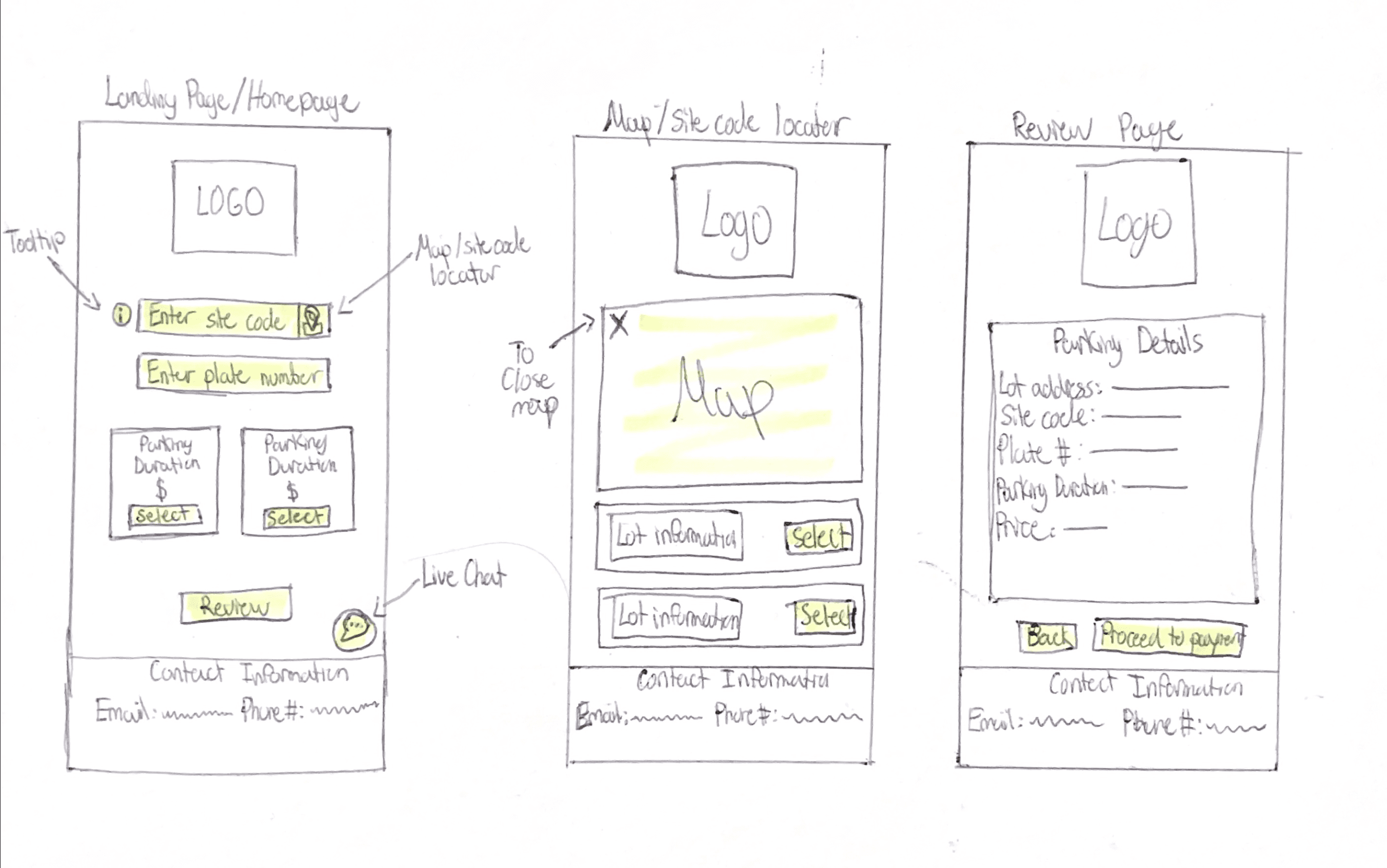
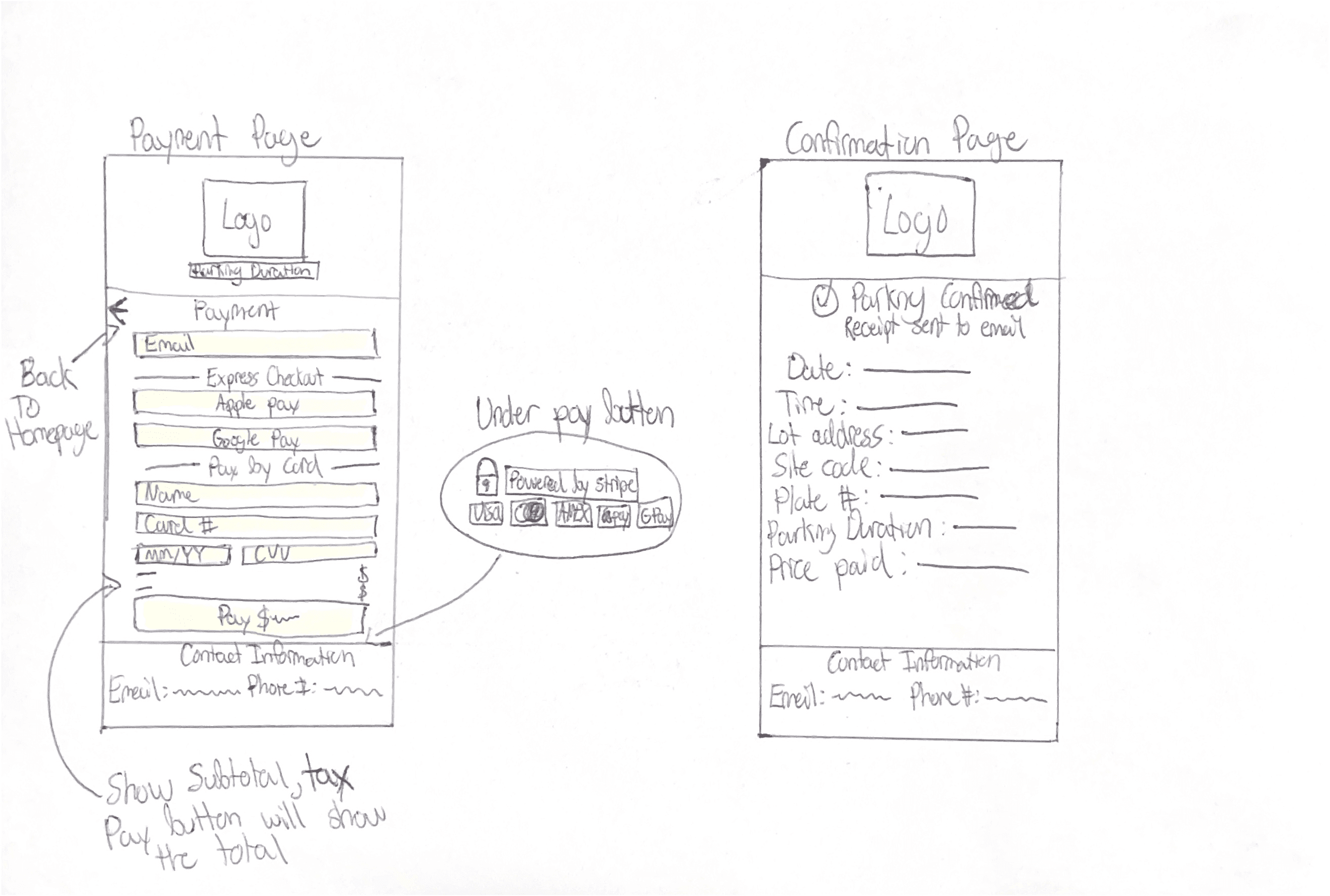
Low-Fidelity Wireframes
Low-Fidelity Wireframes
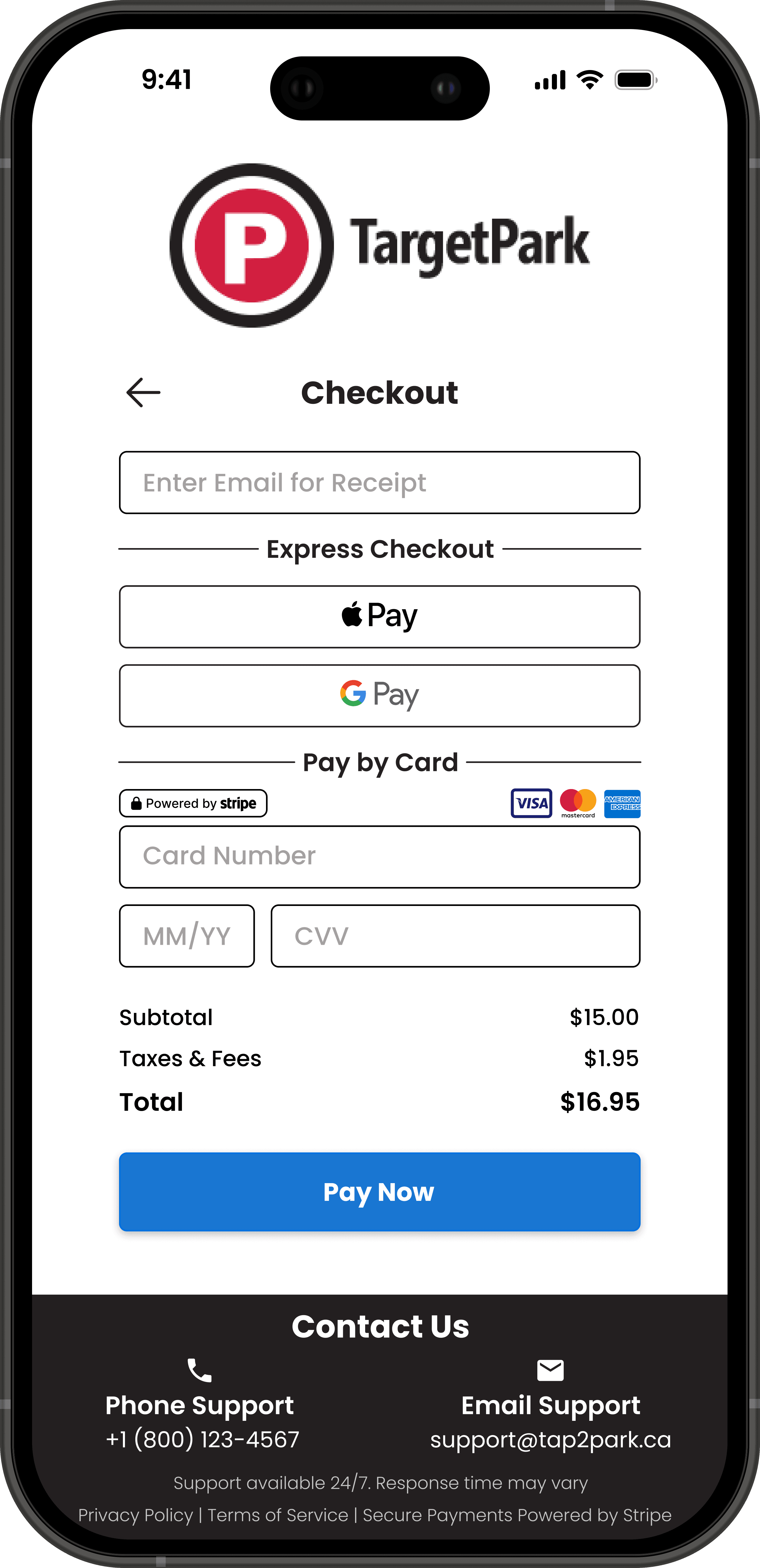
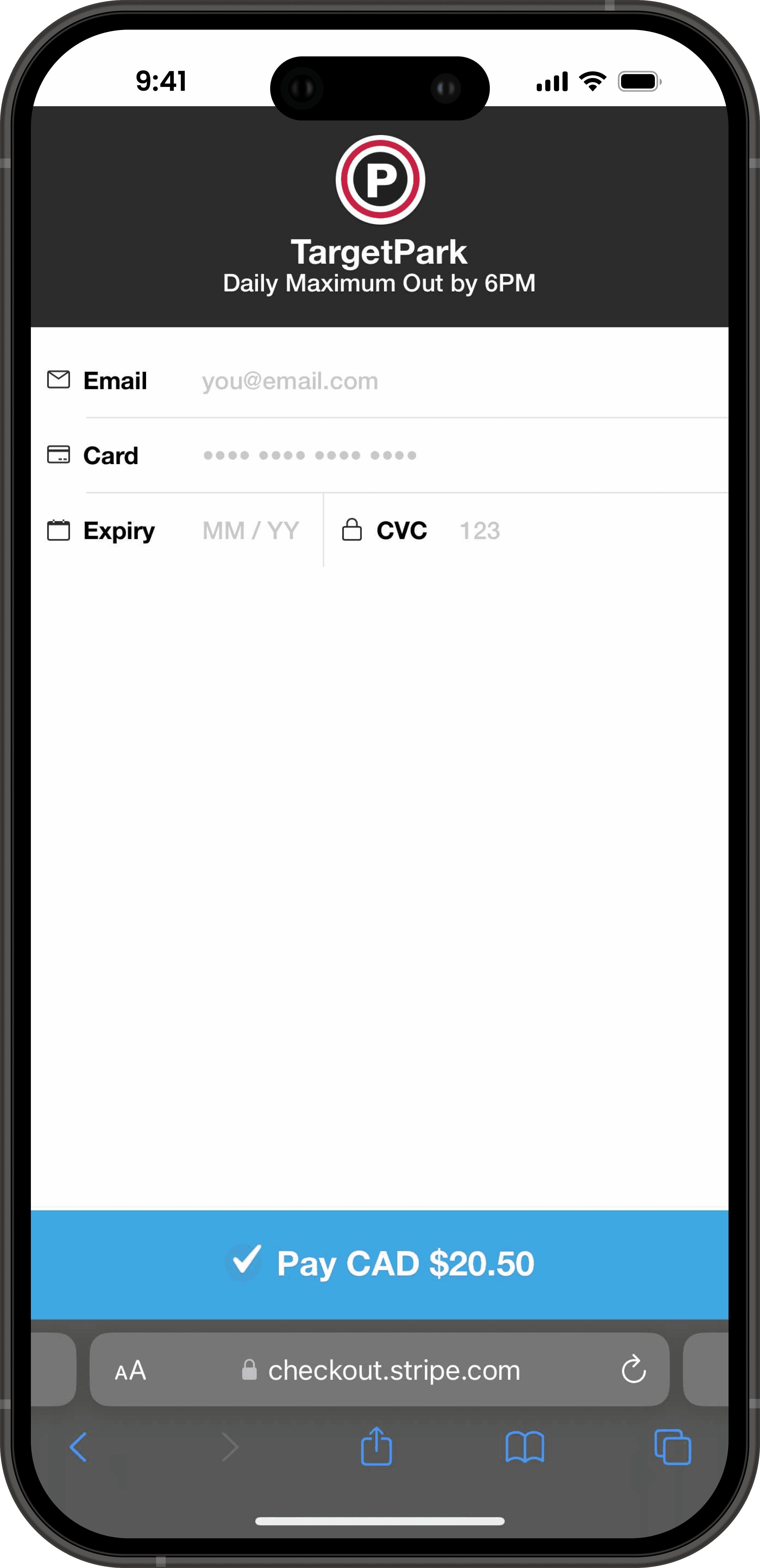
Visual Comparison
Original Homepage
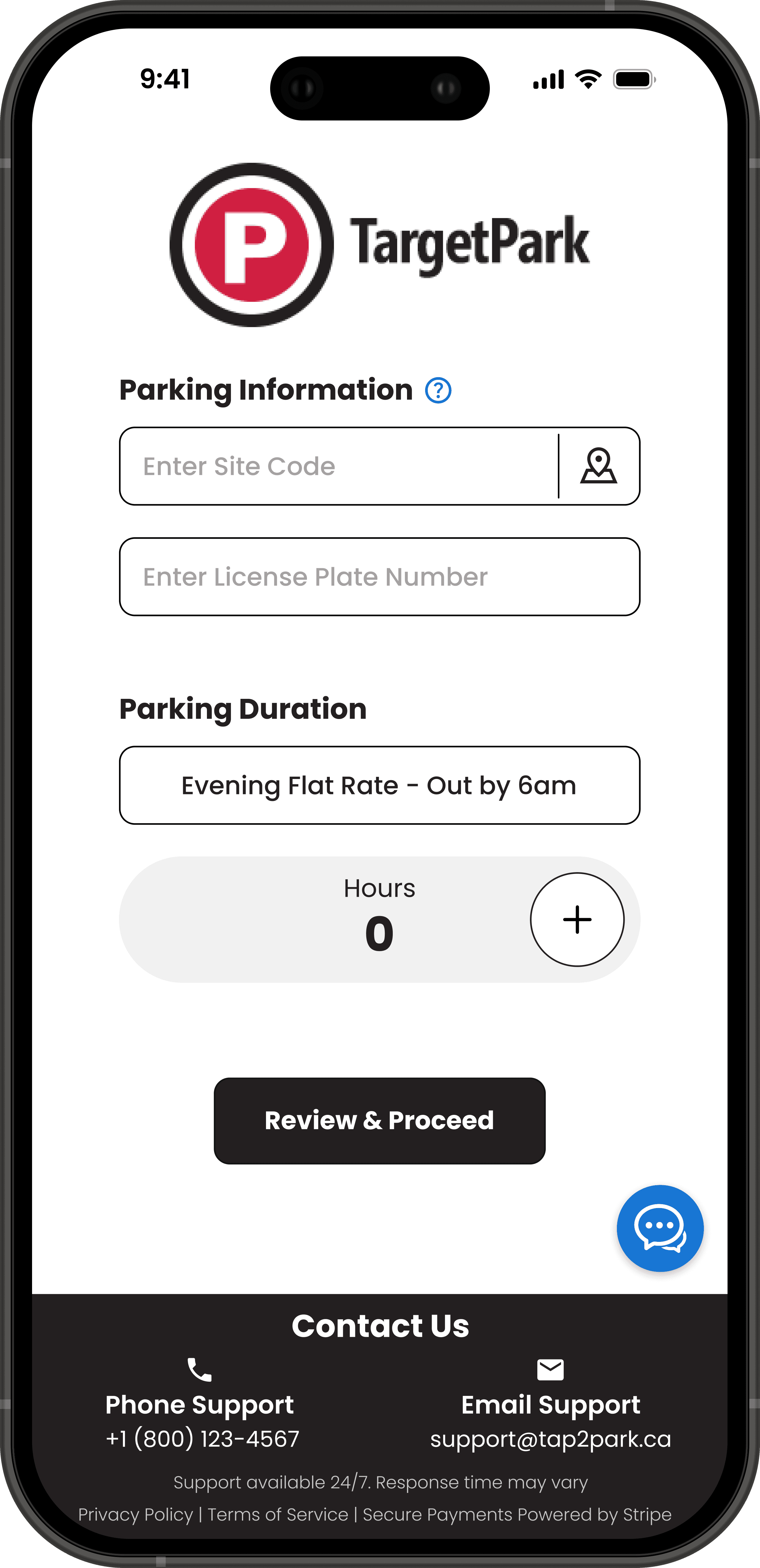
Redesigned Homepage
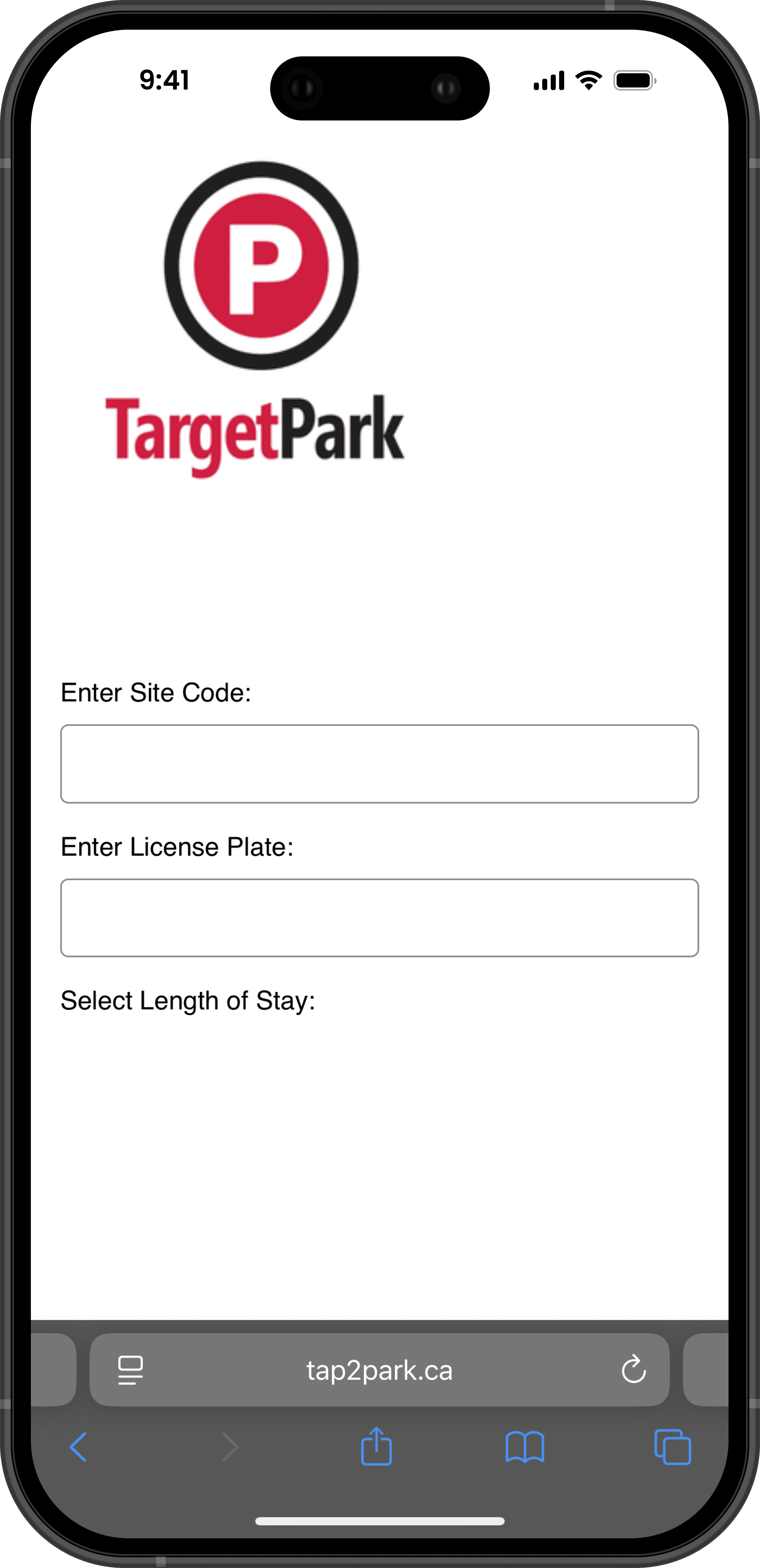
Original Payment Page
Redesigned Payment Page
Tap2park.ca
Tap2park.ca
Tap2park.ca
Tap2park.ca
Concept Redesign
Concept Redesign
Concept Redesign
Concept Redesign
New Features
Map Locator
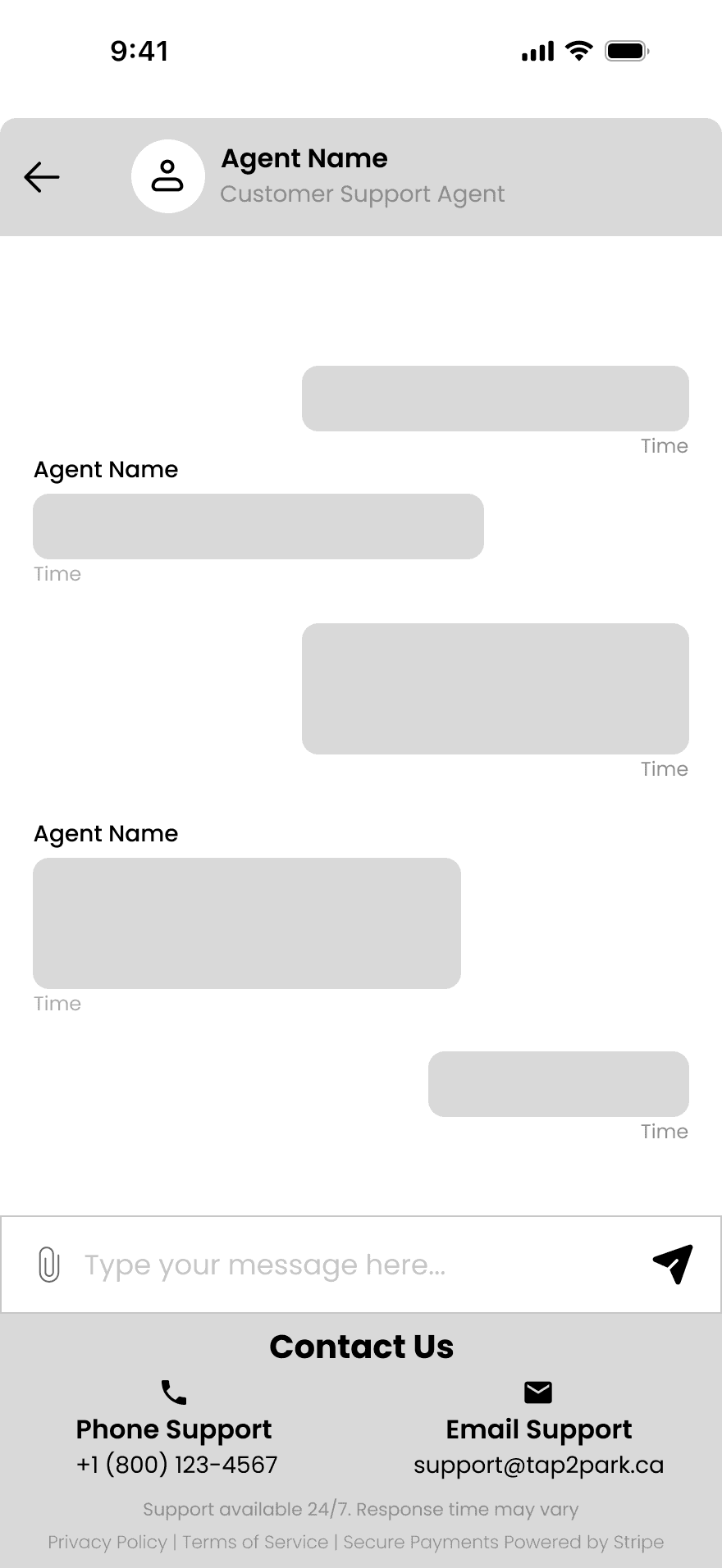
Live Chat
Contact Section
Security Indicators
Digital Wallet Payment Options
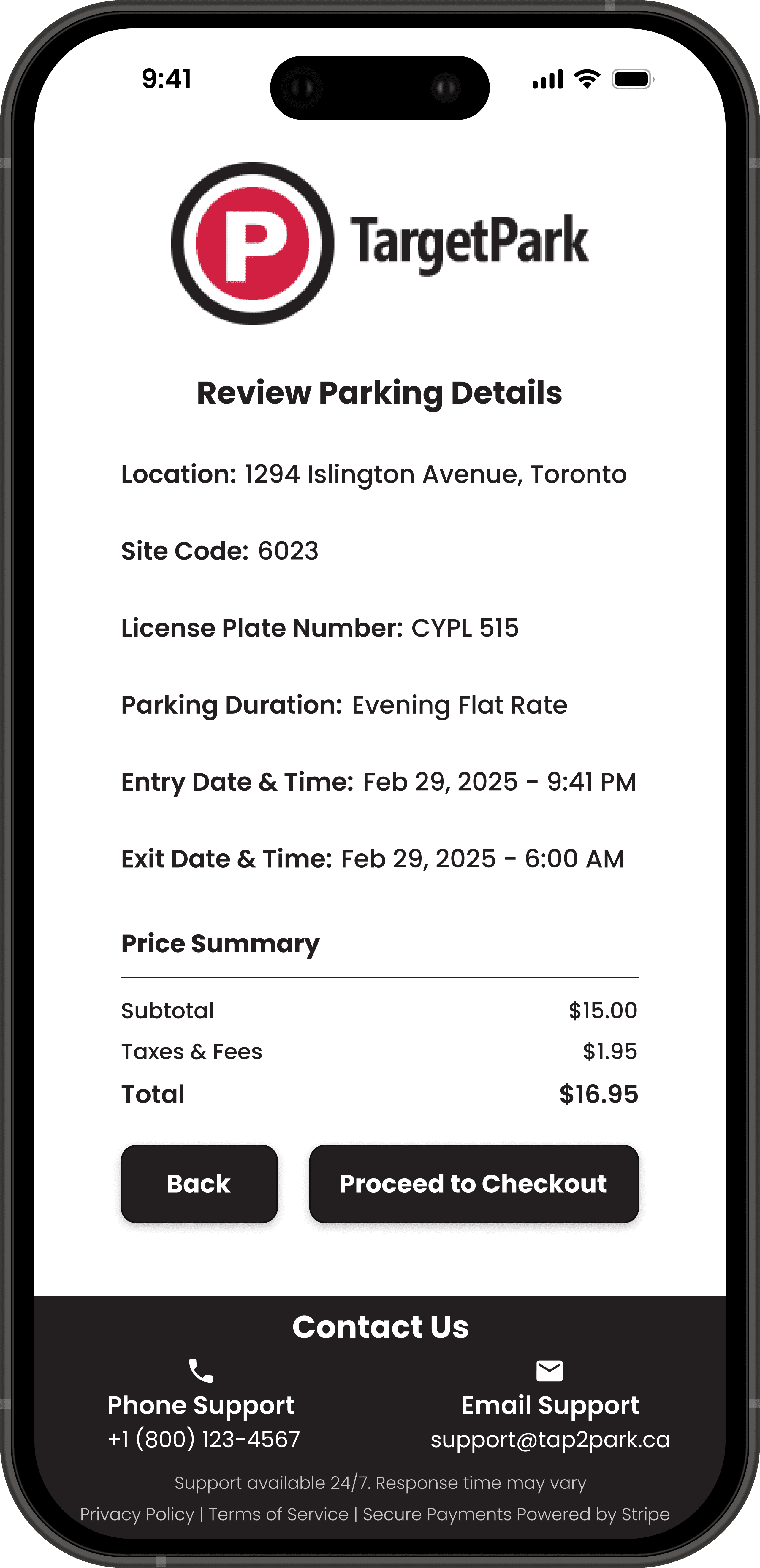
Review Page
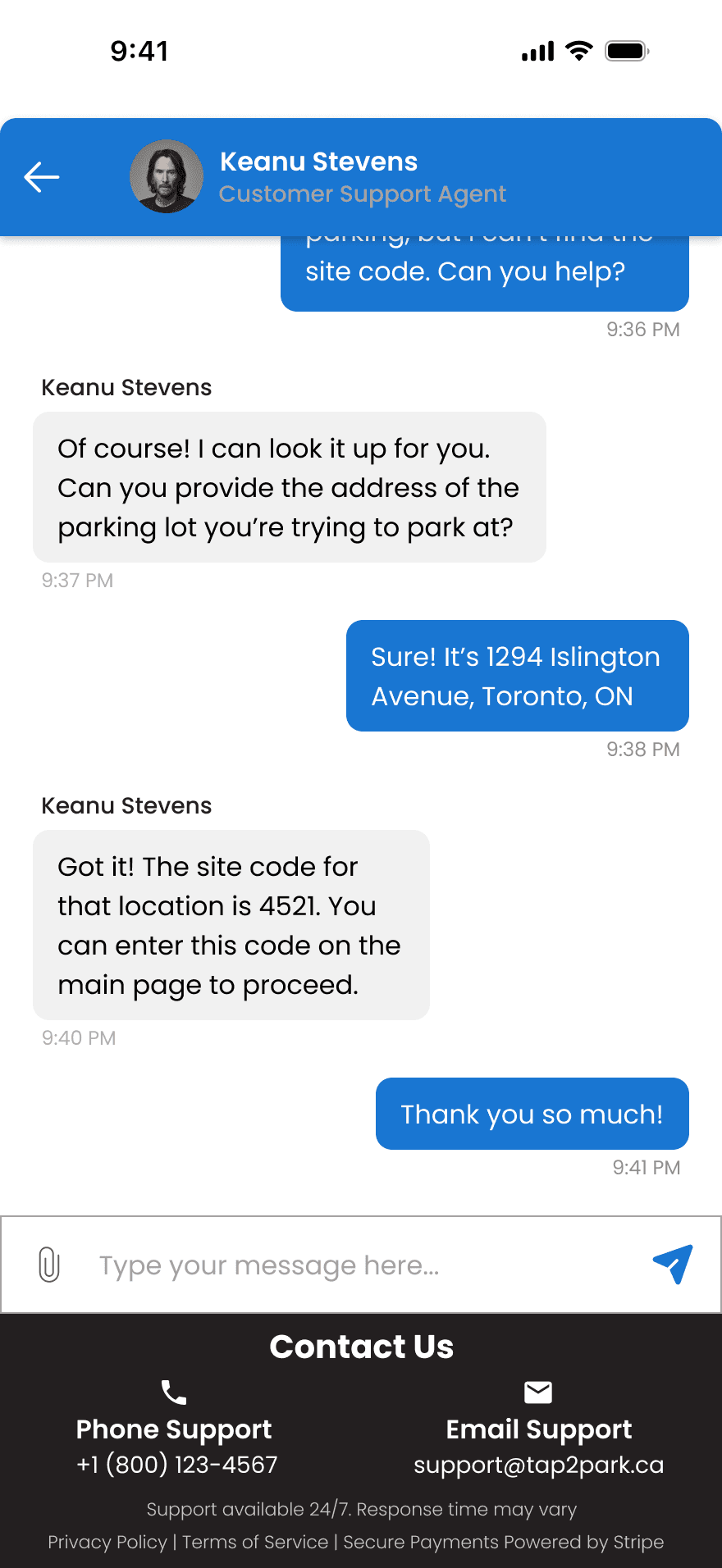
Provides instant support through live chat, reducing user frustration and improving confidence during the parking process.
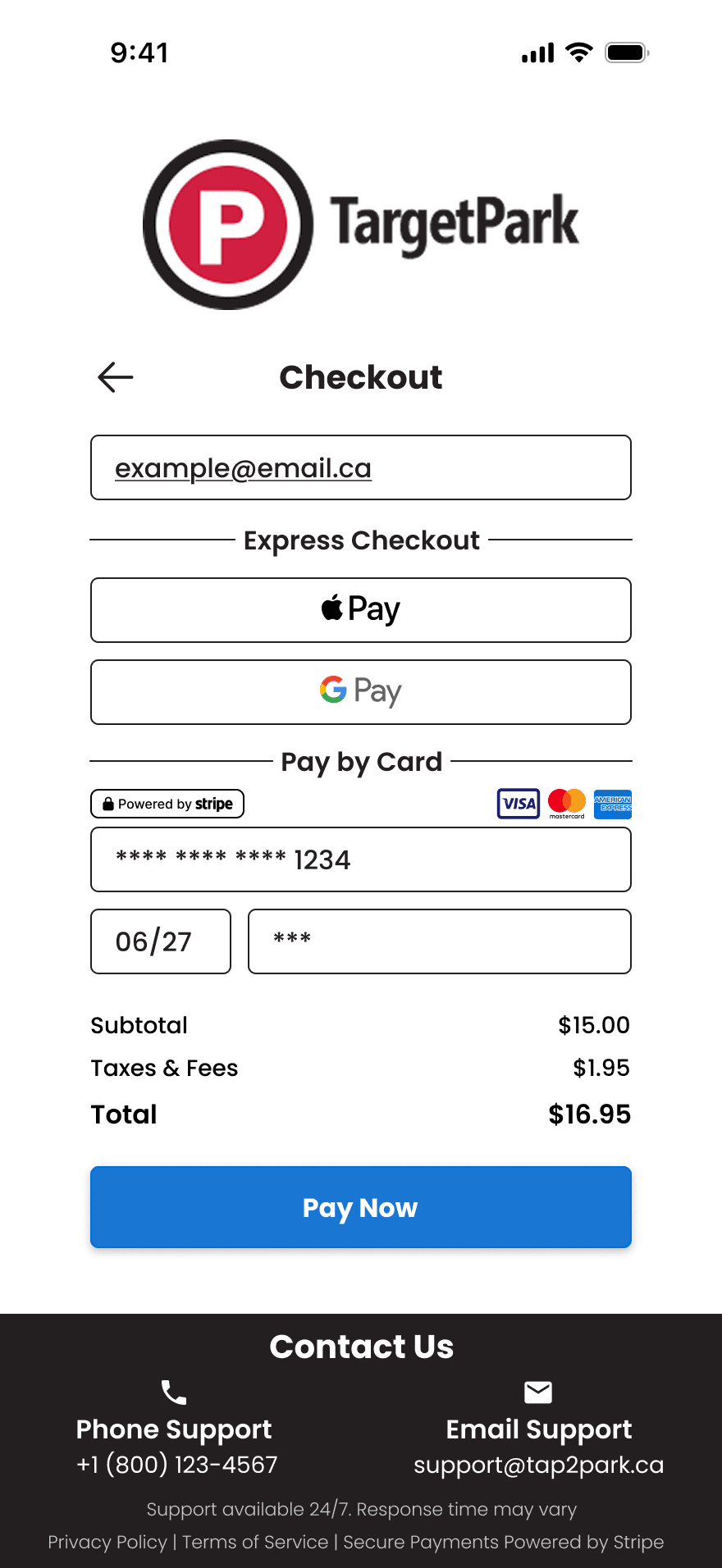
Security indicators like lock icons and “Secure Payment” labels provide reassurance and reduce hesitation during checkout.
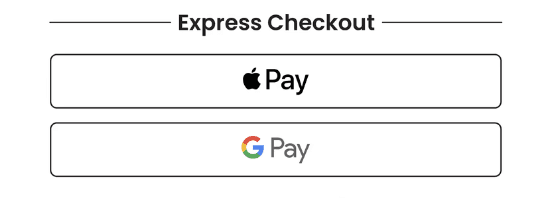
Supports Apple Pay and Google Pay for a streamlined checkout experience, reducing friction and improving convenience on mobile devices.
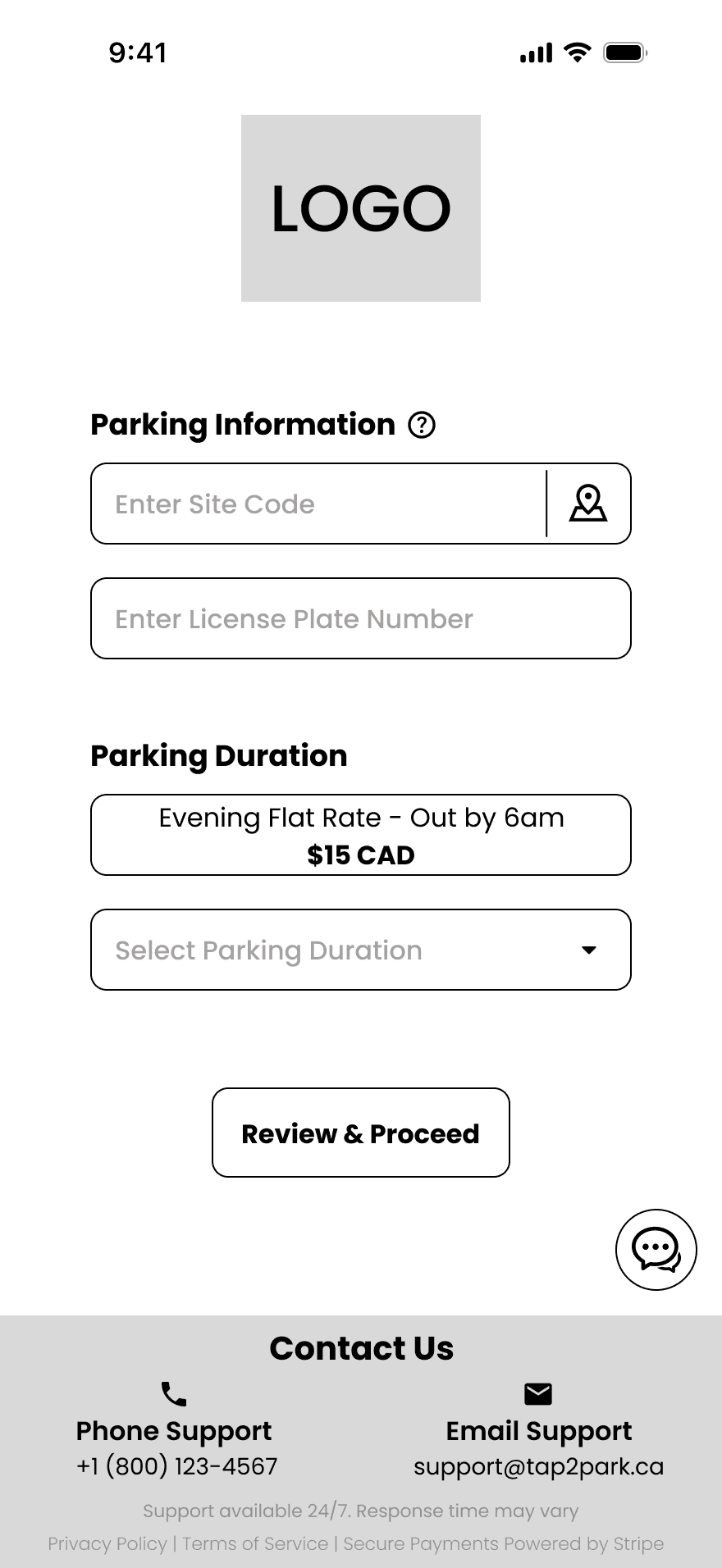
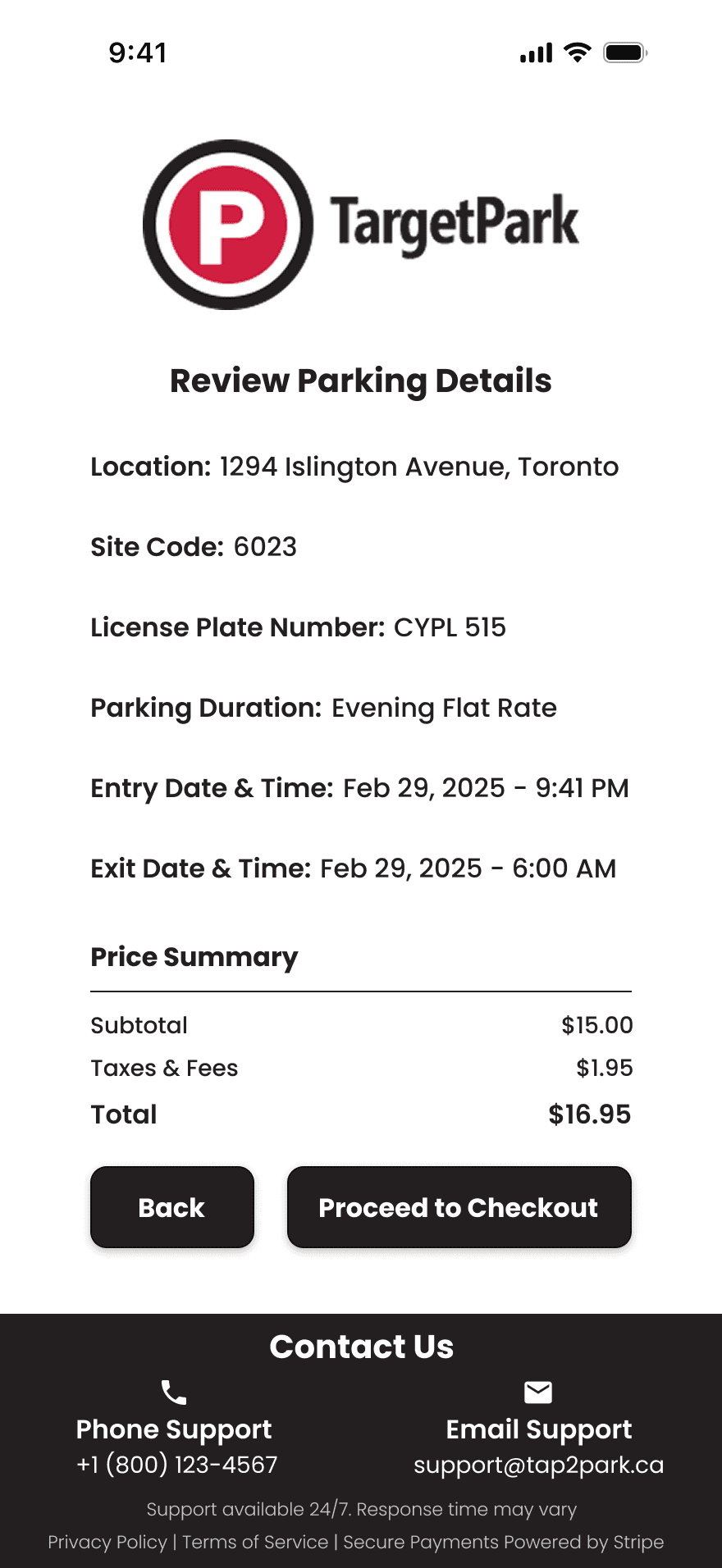
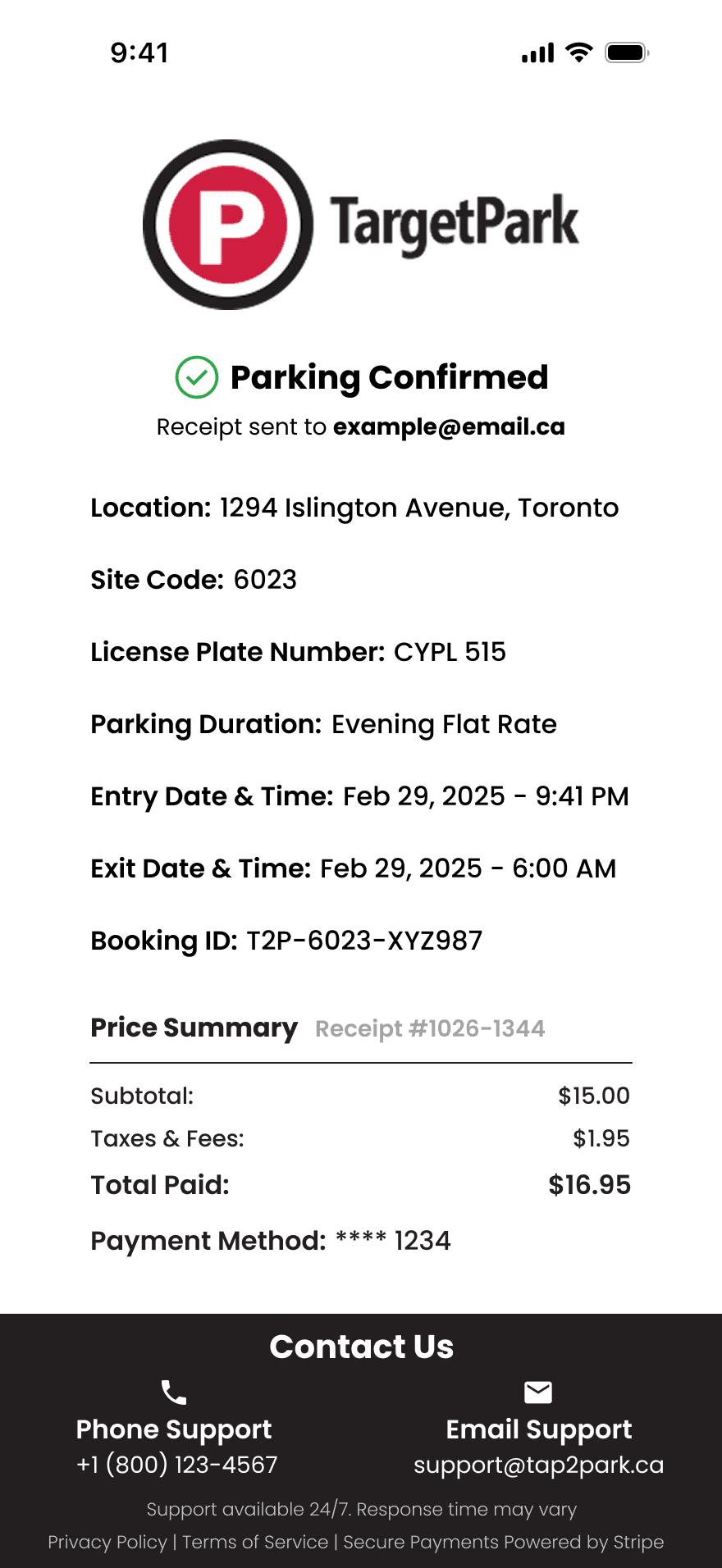
The new review page lets users double check all parking details before submitting, minimizing input errors, preventing accidental fines and boosting confidence at checkout.
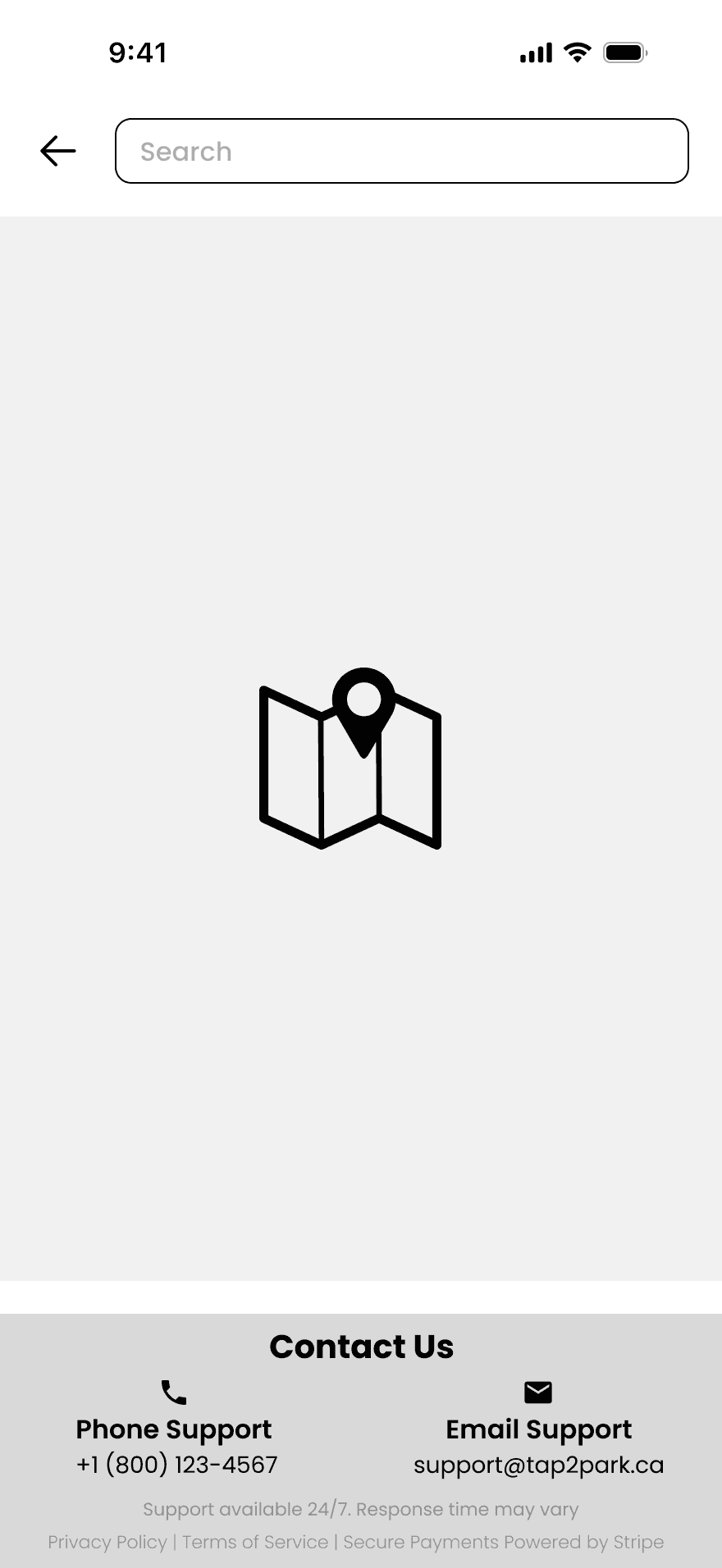
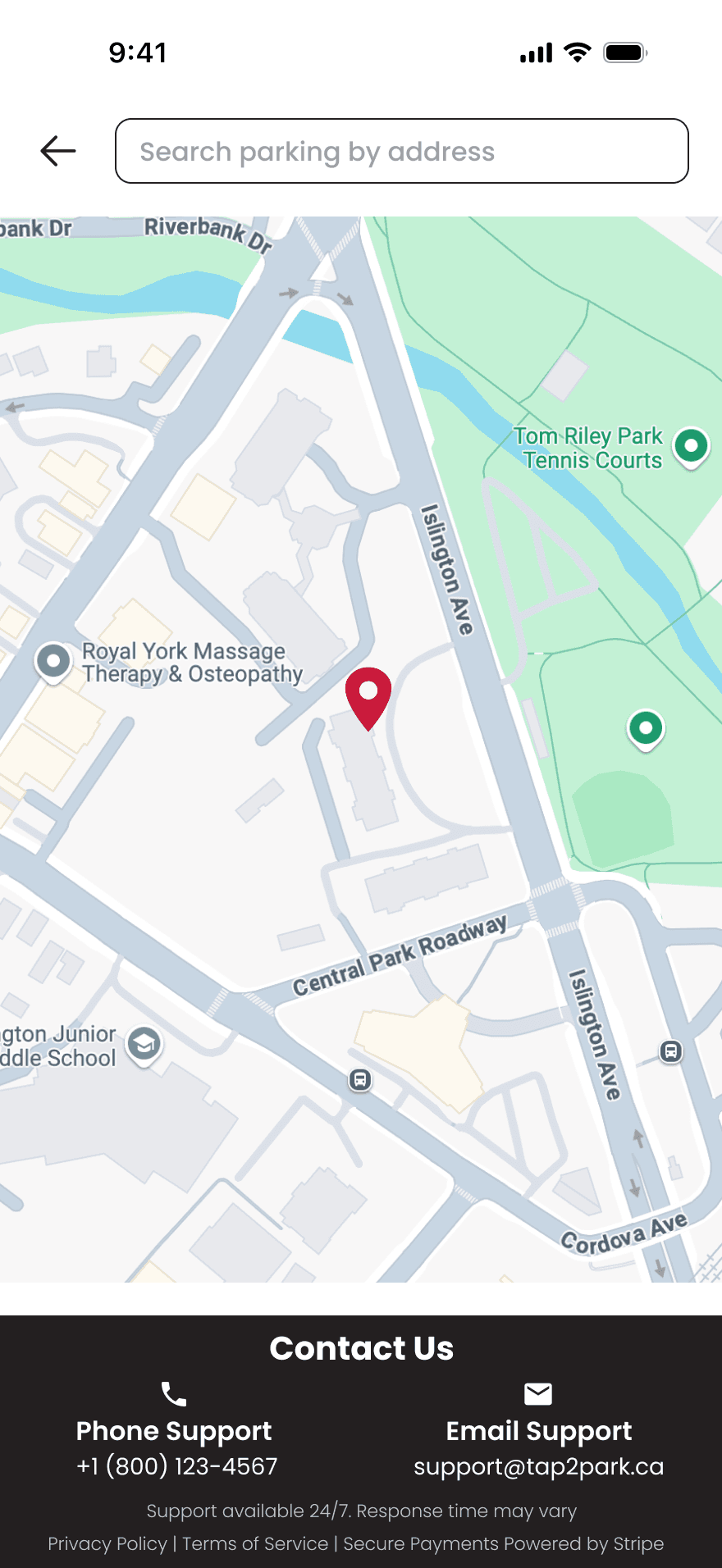
Opens an interactive map that helps users quickly find nearby parking zones and correct site codes, reducing errors and confusion.
Opens an interactive map that helps users quickly find nearby parking zones and correct site codes, reducing errors and confusion.
Provides easy access to phone and email support, reducing frustration and helping users feel supported throughout the parking process.
Supports Apple Pay and Google Pay for a streamlined checkout experience, reducing friction and improving convenience on mobile devices.
Tooltip Helper
Reduces confusion by showing users exactly where to find the required site code, on the physical meter or within the built in map feature.
Tooltip Helper
Reduces confusion by showing users exactly where to find the required site code, on the physical meter or within the built in map feature.
Security Indicators
Security indicators like lock icons and “Secure Payment” labels provide reassurance and reduce hesitation during checkout.
Digital Wallet Payment Options
Neutral
Successful
Unsuccessful
Pay Now
Hours
0
Hours
1
Unselected
Parking Duration Buttons
Static Buttons
Payment Button
Live Chat Button
Selected
Evening Flat Rate - Out by 6am
Evening Flat Rate - Out by 6am
Unselected
Selected
Proceed to Checkout
Review & Proceed
Review & Proceed
Select
Back
Buttons
Brand Logo

The Tap2Park logo is consistently placed at the top of every screen to reinforce brand presence and guide the user, with the exception of the map screen and live chat, where screen space and functionality take priority.
The Tap2Park logo is consistently placed at the top of every screen to reinforce brand presence and guide the user, with the exception of the map screen and live chat, where screen space and functionality take priority.
Interaction Examples
Start To Finish
Start To Finish
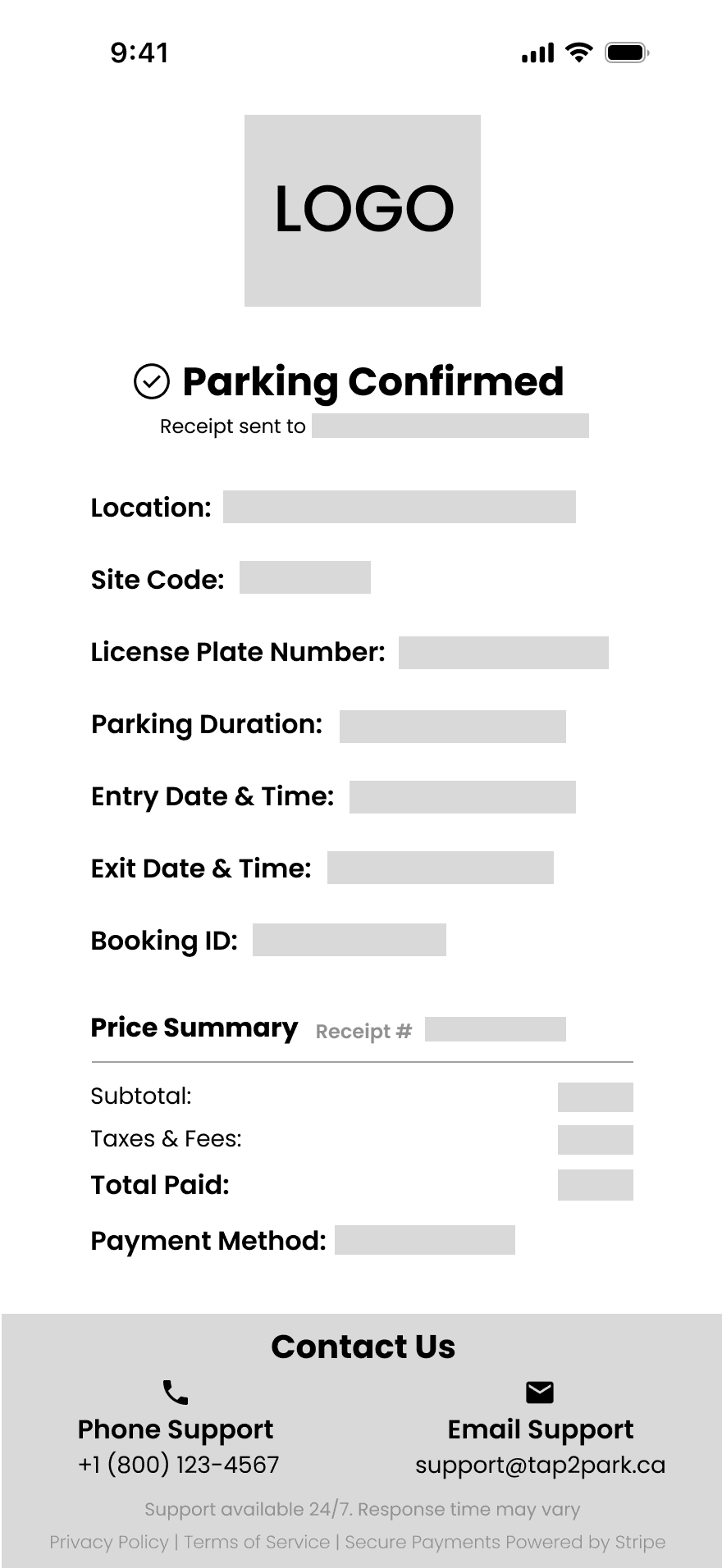
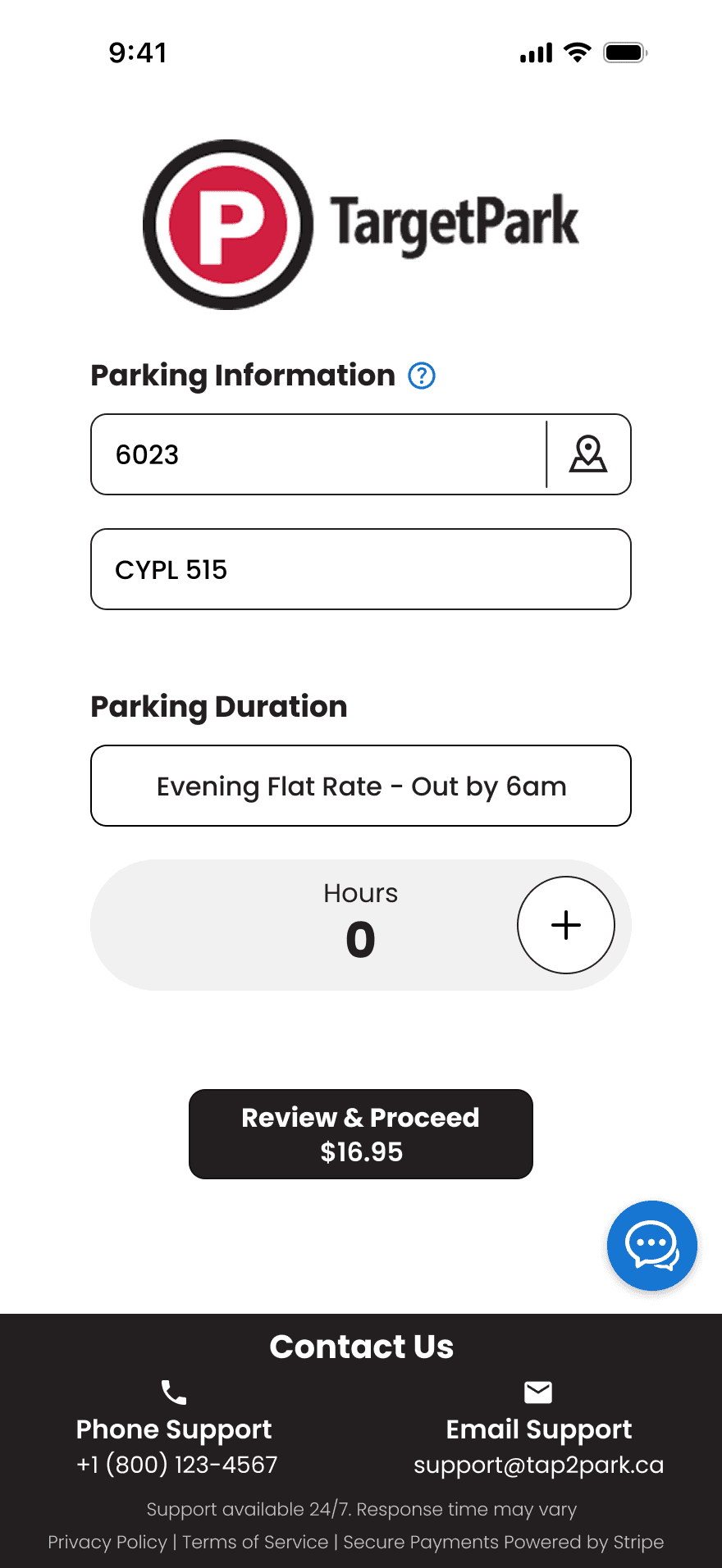
From entering a license plate and site code, to selecting parking duration and completing payment, the entire flow is designed to be quick, intuitive, and error-free.
Tool Tip and Live Chat
Helpful tool tips and an integrated live chat make it easier for users to get answers in real time, reducing errors and confusion.
Interactive Map Feature
The map helps users quickly locate nearby parking lots and view their site codes. When a lot is selected, the site code autofills automatically, reducing errors and making the process even faster.
Design Style Guide
Colour Palette
Vibrant Red
#D01F41
Charcoal Gray
#231F20
Represents elegance, seriousness, and professionalism.
Used for all elements in the app that require a dark colour, offering a softer alternative to pure black to reduce eye strain.
Represents urgency and attention.
Used for the unsuccessful payment variation of the “Pay Now” button and error message.
Pure White
#FFFFFF
Represents cleanliness, clarity, and neutrality.
Used for background, text, icons, input fields and buttons.
Represents success, positivity and confirmation.
Used for the checkmark on the confirmation page and the successful payment variation of the “Pay Now” button.
Success Green
#28A745
Trust Blue
#1976D2
Represents trust, reliability, and action.
Used for live chat, tool tip icon, active selection status of the flat rate button and the “Pay Now” button.
Icons
Brand Logo
The Tap2Park logo is consistently placed at the top of every screen to reinforce brand presence and guide the user, with the exception of the map screen and live chat, where screen space and functionality take priority.
Typography
Section Title
Subheading
Example
Weight / Size
Font Used: Poppins
Line Height
Letter Spacing
Alignment
Bold / 20px
Bold / 18-16px
SemiBold / 16px
Medium / 16-14px
Medium / 14px
Light / 11px
Regular / 16-14px
30px (auto)
27-24px (auto)
24px (auto)
24-21px (auto)
24-21px (auto)
21px (auto)
17px (auto)
0%
0%
0%
0%
0%
0%
0%
Center
Center
Left
Left
Left
Left
Left
Label
Label Medium
Body Medium
Body Regular
Body Light
Neutral
Successful
Unsuccessful
Pay Now
Hours
0
Hours
1
Unselected
Parking Duration Buttons
Static Buttons
Payment Button
Selected
Evening Flat Rate - Out by 6am
Evening Flat Rate - Out by 6am
Unselected
Selected
Proceed to Checkout
Review & Proceed
Select
Back
Buttons
Live Chat Button
Components & Inputs
Enter License Plate Number
Unfilled
Homepage
Checkout Page
Unfilled
CYPL 515
Filled
Filled
Enter Site Code
6023
Unfilled
Unfilled
Inactive
Site code can be found at pay machine
OR
Use the map
Active
Enter Email for Receipt
Filled
example@email.ca
Card Number
1234 5678 9000 1234
Filled
Unfilled
CVV
Filled
123
MM/YY
Unfilled
Filled
06/27
Live Chat
Unfilled
Type your message here...
Filled
Hello
Agent Name
Time
Message
Time
Message
Agent Name
Customer Support Agent
Map Page
Unfilled
Search parking by address
Filled
1294 Islington Avenue, Toronto
Popups
Inactive
Active
Site Code
6023
Location
1294 Islington Avenue, Toronto
Select
Site Code
6023
Location
1294 Islington Avenue, Toronto
Selected
Tool Tip Icon Popup
Site code can be found at pay machine
OR
On the map
Error Message
Missing Information
Please enter all details before proceeding
Contact Section
Contact Us
Support available 24/7. Response time may vary
Phone Support
+1 (800) 123-4567
Email Support
support@tap2park.ca
Privacy Policy | Terms of Service | Secure Payments Powered by Stripe
Reflections
• Designing a review step highlighted how small UX changes can meaningfully reduce user errors.
• Emphasizing clarity and trust reinforced the importance of visual hierarchy in payment-based experiences.
Reflections
• Designing a review step highlighted how small UX changes can meaningfully reduce user errors.
• Emphasizing clarity and trust reinforced the importance of visual hierarchy in payment-based experiences.
Design Goals
Add digital wallet options for faster and more flexible payments.
Make help and support easier to find and access.
Refresh the interface with a cleaner, more modern look that builds trust through visual consistency.
Help users avoid mistakes by adding a clear review step before payment.
Use tooltips and helpful messages to guide users through the process
Include visible security indicators to build trust with users.
Visual Comparison
Original Homepage
Redesigned Homepage
Original Payment Page
Redesigned Payment Page
Interaction Examples
Start To Finish
From entering a license plate and site code, to selecting parking duration and completing payment, the entire flow is designed to be quick, intuitive, and error-free.
Tool Tip and Live Chat
Helpful tool tips and an integrated live chat make it easier for users to get answers in real time, reducing errors and confusion.
Interactive Map Feature
The map helps users quickly locate nearby parking lots and view their site codes. When a lot is selected, the site code autofills automatically, reducing errors and making the process even faster.
New Features
Map Locator
Live Chat
Contact Section
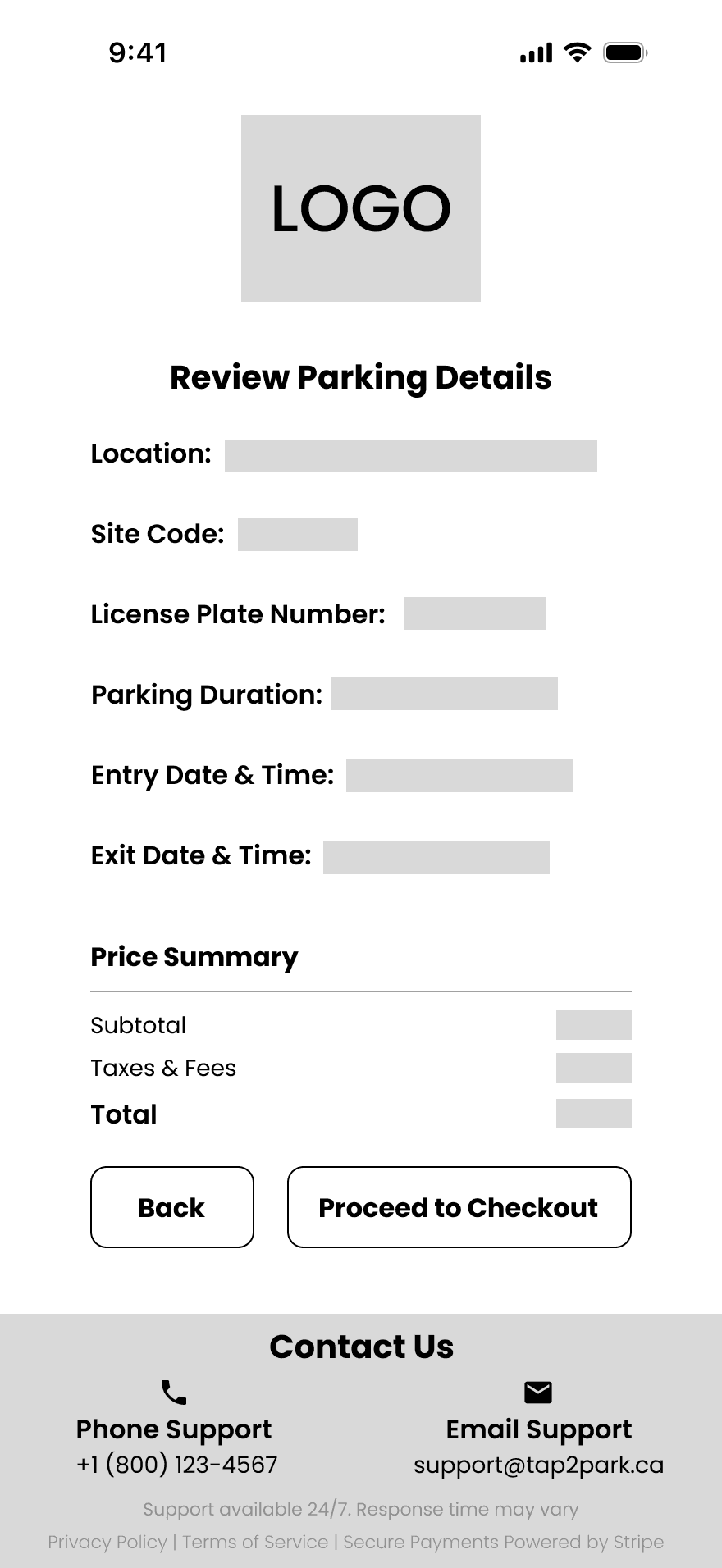
Review Page
The new review page lets users double check all parking details before submitting, minimizing input errors, preventing accidental fines and boosting confidence at checkout.
Opens an interactive map that helps users quickly find nearby parking zones and correct site codes, reducing errors and confusion.
Provides easy access to phone and email support, reducing frustration and helping users feel supported throughout the parking process.
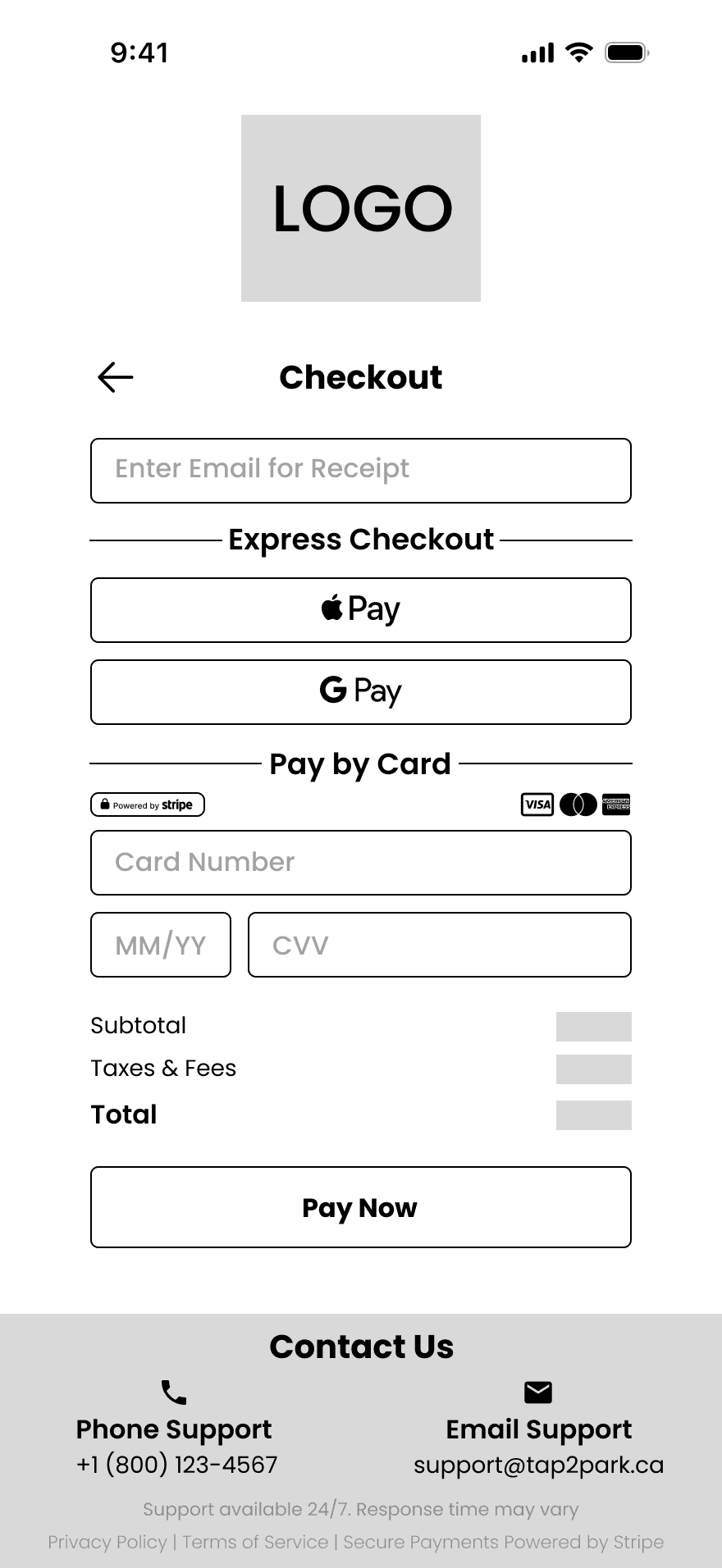
Supports Apple Pay and Google Pay for a streamlined checkout experience, reducing friction and improving convenience on mobile devices.
Tooltip Helper
Reduces confusion by showing users exactly where to find the required site code, on the physical meter or within the built in map feature.
Security Indicators
Security indicators like lock icons and “Secure Payment” labels provide reassurance and reduce hesitation during checkout.
Digital Wallet Payment Options
Provides instant support through live chat, reducing user frustration and improving confidence during the parking process.
Mid-Fidelity Wireframes
High-Fidelity Wireframes
Mid-Fidelity Wireframes
High-Fidelity Wireframes
Mid-Fidelity Wireframes
High-Fidelity Wireframes
Design Style Guide
Colour Palette
Vibrant Red
#D01F41
Represents urgency and attention.
Used for the unsuccessful payment variation of the “Pay Now” button and error message.
Charcoal Gray
#231F20
Represents elegance, seriousness, and professionalism.
Used for all elements in the app that require a dark colour, offering a softer alternative to pure black to reduce eye strain.
Pure White
#FFFFFF
Represents cleanliness, clarity, and neutrality.
Used for background, text, icons, input fields and buttons.
Success Green
#28A745
Trust Blue
#1976D2
Represents trust, reliability, and action.
Used for live chat, tool tip icon, active selection status of the flat rate button and the “Pay Now” button.
Represents success, positivity and confirmation.
Used for the checkmark on the confirmation page and the successful payment variation of the “Pay Now” button.
Icons
Brand Logo
The Tap2Park logo is consistently placed at the top of every screen to reinforce brand presence and guide the user, with the exception of the map screen and live chat, where screen space and functionality take priority.
Neutral
Successful
Unsuccessful
Pay Now
Hours
0
Hours
1
Unselected
Parking Duration Buttons
Static Buttons
Payment Button
Selected
Evening Flat Rate - Out by 6am
Evening Flat Rate - Out by 6am
Unselected
Selected
Proceed to Checkout
Review & Proceed
Select
Back
Buttons
Live Chat Button
Components & Inputs
Enter License Plate Number
Unfilled
Homepage
Checkout Page
Unfilled
CYPL 515
Filled
Filled
Enter Site Code
6023
Unfilled
Unfilled
Inactive
Site code can be found at pay machine
OR
Use the map
Active
Enter Email for Receipt
Filled
example@email.ca
Card Number
1234 5678 9000 1234
Filled
Unfilled
CVV
Filled
123
MM/YY
Unfilled
Filled
06/27
Live Chat
Unfilled
Type your message here...
Filled
Hello
Agent Name
Time
Message
Time
Message
Agent Name
Customer Support Agent
Map Page
Unfilled
Search parking by address
Filled
1294 Islington Avenue, Toronto
Popups
Inactive
Active
Site Code
6023
Location
1294 Islington Avenue, Toronto
Select
Site Code
6023
Location
1294 Islington Avenue, Toronto
Selected
Tool Tip Icon Popup
Site code can be found at pay machine
OR
On the map
Error Message
Missing Information
Please enter all details before proceeding
Contact Section
Some components are scaled down in this portfolio’s mobile view for presentation.
Contact Us
Support available 24/7. Response time may vary
Phone Support
+1 (800) 123-4567
Privacy Policy | Terms of Service | Secure Payments Powered by Stripe
Email Support
support@tap2park.ca
Typography
Example:
Weight / Size:
Line Height:
Letter Spacing:
Alignment:
Font Used: Poppins
Section Title
Bold / 20px
30px (auto)
0%
Center
Example:
Weight / Size:
Line Height:
Letter Spacing:
Alignment:
Subheading
Bold / 18-16px
27-24px (auto)
0%
Left
Example:
Weight / Size:
Line Height:
Letter Spacing:
Alignment:
Label
SemiBold / 16px
24px (auto)
Left
0%
Example:
Weight / Size:
Line Height:
Letter Spacing:
Alignment:
Body Medium
Medium / 16-14px
24-21px (auto)
0%
Left
Example:
Weight / Size:
Line Height:
Letter Spacing:
Alignment:
Body Regular
Regular / 16-14px
24-21px (auto)
0%
Left
Example:
Weight / Size:
Line Height:
Letter Spacing:
Alignment:
Label Medium
Medium / 14px
21px (auto)
0%
Left
Example:
Weight / Size:
Line Height:
Letter Spacing:
Alignment:
Body Light
Light / 11px
17px (auto)
0%
Center
Reflections
Emphasizing clarity and trust reinforced the importance of visual hierarchy in payment-based experiences.
Designing a review step highlighted how small UX changes can meaningfully reduce user errors.
Project Overview
Timeline
7 Weeks - Individual Project
Tools
Figma
Role
UI/UX Designer
Desciption
Tap2Park is a mobile friendly web app that allows users to pay for parking digitally. This redesign reimagines the website with an app like interface to improve clarity, reduce user errors, and create a more intuitive and trustworthy experience. By refining the layout, introducing a review step, and adding support and security features, the updated design helps users complete parking sessions with greater confidence and less friction.
This project is a conceptual redesign and is not affiliated with or endorsed by Target Park.